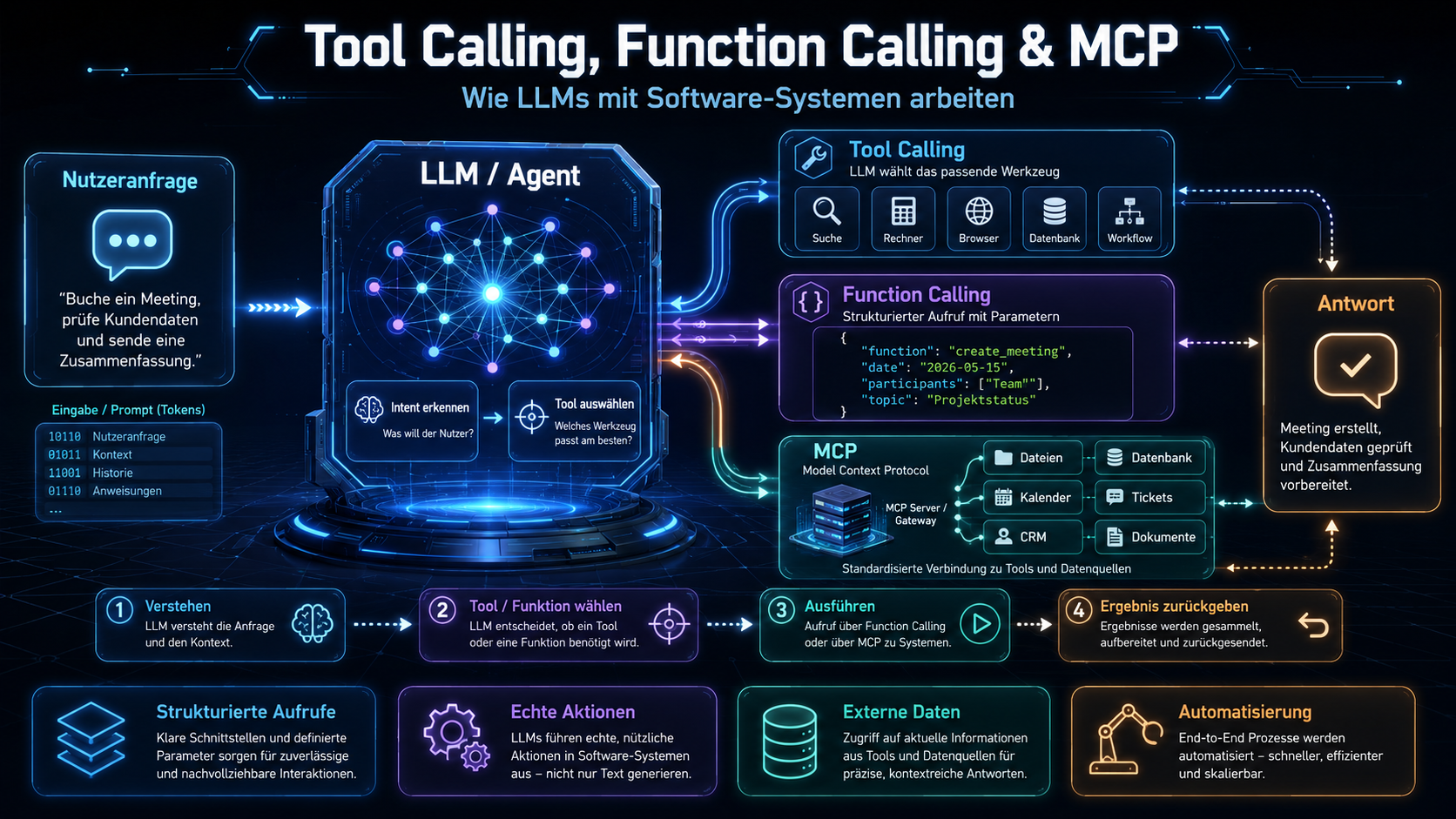
An LLM that can only answer is a dictionary with opinions. An LLM that can drive software is a productive actor. Tool calling, function calling, and the Model Context Protocol (MCP) are the interfaces enabling that transformation. In 2026 they’re indispensable for any serious enterprise AI application. This article explains how they work and what discipline they demand.
1. Why LLMs need tools
An LLM doesn’t know who called today. It doesn’t know current inventory. It can’t send an email, issue an invoice, or delete a record. Its knowledge is frozen at training time, its action limited to text output.
Tool calling breaks this constraint: the LLM gets a list of tools (functions, APIs, database accessors) it can invoke when needed. It produces structured calls (function name + arguments), an external system executes them, the output flows back into the LLM, which then derives the next action or the final answer.
This turns the LLM into a reasoning layer over existing software — a language-understanding front end for any system that has an API.
2. Function calling — structured tool interfaces
Function calling is the technical primitive. A function is described by a schema — name, description, typed arguments. The LLM receives this in its system prompt and can produce a call when relevant:
{
  "name": "get_customer_by_id",
  "arguments": {
    "customer_id": "C-4711"
  }
}
The calling system validates the schema, runs the function, and returns the result in structured form:
{
  "id": "C-4711",
  "name": "Müller GmbH",
  "open_invoices": 3,
  "credit_limit": 50000
}
The LLM uses that to answer the original question or plan further calls. Multiple calls in sequence form an agent workflow. See What is an AI agent?.
3. Model Context Protocol — the 2026 standard
Before MCP, every tool integration had to be written separately: one piece of code for OpenAI, one for Anthropic, one for your own database, one for every customer system. That doesn’t scale.
The Model Context Protocol (MCP), introduced by Anthropic in late 2024 and broadly adopted since 2025, standardizes this connection. An MCP server exposes three classes of resources:
- Tools. Functions the LLM can call.
- Resources. Data the LLM can read (files, records, documents).
- Prompts. Predefined task formulations.
An MCP client (an LLM front end, an agent platform, a coding IDE) can use any MCP server without writing dedicated code. Because it was so broadly adopted, by 2026 a growing ecosystem of MCP servers exists for GitHub, databases, Slack, Confluence, ERP systems and more.
For enterprises this means: an MCP server built once for an internal system is reusable across all current and future LLM applications.
4. Tool calling in agent workflows
An agent workflow composes multiple tool calls into a solution:
- User: “Send customer C-4711 a dunning notice for the open invoice.”
- Agent calls
get_customer_by_id(C-4711). - Agent calls
get_open_invoices(customer_id=C-4711). - Agent calls
generate_dunning_letter(invoice_id=...). - Agent shows the result and asks for confirmation.
- After confirmation the agent calls
send_email(...).
The reasoning about step sequencing comes from the LLM. Reasoning models (see Reasoning models) are often substantially better here because they can verify plans before execution.
5. Security and permissions
Tool calling is a security interface. Three principles are non-negotiable:
- Least privilege. Every tool gets only the minimal needed rights. Read-only tools should be read-only, not “almost read-only with occasional writes.”
- Permissions on the server side. The LLM isn’t trustworthy. Permissions are checked before execution in the server, not suggested in the prompt.
- Human-in-the-loop for sensitive actions. Deletes, payments, external emails, irreversible operations require human confirmation. An LLM yes isn’t enough.
Also relevant: sandboxing tool execution, rate limiting, input validation. See Secure AI integration.
6. Logging, audit and reproducibility
Every tool call must be fully logged:
- LLM input. Which prompt, which context.
- Selected tool and arguments. What was called.
- Tool output. What came back.
- LLM follow-up decision. How the result was interpreted.
- Metadata. Model version, timestamp, user, session id.
Without this logging, tool-calling bugs are hard to reproduce and audits impossible. In regulated environments this is not optional but a compliance requirement — particularly under the EU AI Act.
Tracing tools like OpenTelemetry with LLM extensions, Langfuse or Helicone simplify this. Anyone running tool calling in production needs them.
7. Practice: integration into existing stacks
Recommended approach for enterprises:
- Identify a use case. A concrete workflow where the LLM adds value by driving software.
- Draw a security map. Which operations are read-only, which write, which are irreversible.
- Build MCP servers for relevant systems. Read-only first, write rights later under approval.
- Eval with real workflows. Test cases with expected behavior, automated validation.
- Logging and audit from day one. Not bolted on later.
- Iterate widely. Simple tools first, then multi-step workflows, then agent architectures.
Tool calling and MCP in 2026 are the most critical interface between LLM and enterprise software. Done cleanly they form the basis for every serious AI integration. Treated as a side feature they produce security holes and unauditable black boxes. An LLM is only as productive as the tools it may use — and the tools are only as safe as they are scoped. More on operations in LLMOps.
Frequently asked questions.
/ 01What's the difference between tool calling and function calling?
The terms are largely synonymous. Function calling is the specific form where the LLM produces structured calls to a defined function (name plus arguments in JSON). Tool calling is the umbrella term for the ability to operate external tools — it covers function calling plus related mechanisms like code interpreters or browser tools.
/ 02What is the Model Context Protocol (MCP)?
MCP is an open protocol that standardizes the connection between LLMs and external tools. An MCP server exposes tools, resources, and prompts; an MCP client (LLM application) can use them without writing a custom integration for each combination. In 2026 MCP became the de facto standard for tool integrations.
/ 03Which LLMs support tool calling?
All modern frontier models: Claude, GPT-4 class, Gemini, Llama-3.1+, Mistral Large, DeepSeek-V3, and many more. Quality varies: Anthropic Claude and OpenAI lead benchmarks, but open-weight models like Llama-3 and Qwen are practical for many applications.
/ 04How do I prevent the LLM from calling dangerous tools?
Permissions on the server side, not in the prompt. The LLM isn't trustworthy — all permissions must be checked before tool execution in a trust zone. Also: dangerous operations (deletes, payments) should require human-in-the-loop approval, not just an LLM yes.
/ 05What about tool calling and prompt injection?
A critical interface. When the LLM picks tool calls based on external text (documents, emails), manipulated text can lure the model into unintended calls. Strict schema validation, isolated sandboxes, restricted tools — see Guardrails, evals and prompt injection.
/ 06How do I debug tool-calling errors?
Structured logging of the whole interaction: input, selected tool, arguments, tool output, final answer. Tracing tools like OpenTelemetry with LLM extensions or specialized platforms like Langfuse or Helicone help. Without clean logging, tool-calling bugs are hard to reproduce.